

|


Configuring GZip compression |
Post Reply 
|
| Author |
 Share Topic Share Topic Printable Version Printable Version Delicious Delicious Digg Digg Facebook Facebook Furl Furl Google Boomarks Google Boomarks Google Buzz Google Buzz MySpace MySpace Newsvine Newsvine reddit reddit StumbleUpon Translate StumbleUpon Translate Twitter Twitter Windows Live Windows Live Yahoo Bookmarks Yahoo Bookmarks Topic Search Topic Search  Topic Options Topic Options
|
rgillingham 
Newbie 
Joined: 23-Aug-2010 Location: UK Posts: 5 |
 Post Options Post Options
 Quote Reply Quote Reply
 Topic: Configuring GZip compression Topic: Configuring GZip compressionPosted: 16-Feb-2011 at 8:17am |
|
I got it working but I had to modify applicationHost.config in C:\Windows\System32\inetsrv\config This is what I put <httpCompression directory="%SystemDrive%\inetpub\temp\IIS Temporary Compressed Files"> <scheme name="gzip" dll="%Windir%\system32\inetsrv\gzip.dll" /> <staticTypes> <add mimeType="text/*" enabled="true" /> <add mimeType="message/*" enabled="true" /> <add mimeType="application/x-javascript" enabled="true" /> <add mimeType="application/atom+xml" enabled="true" /> <add mimeType="application/xaml+xml" enabled="true" /> <add mimeType="application/soap+msbin1" enabled="true" /> <add mimeType="*/*" enabled="false" /> </staticTypes> <dynamicTypes> <add mimeType="text/*" enabled="true" /> <add mimeType="message/*" enabled="true" /> <add mimeType="application/x-javascript" enabled="true" /> <add mimeType="*/*" enabled="false" /> <add mimeType="application/soap+msbin1" enabled="true" /> </dynamicTypes> </httpCompression> Richard |
|
 |
|
|
kimj
IdeaBlade 

Joined: 09-May-2007 Posts: 1391 |
Post Options
Quote Reply
Posted: 14-Feb-2011 at 6:05pm |
|
Message compression should be coming to DevForce Silverlight in release 6.0.9, which is due next month.
Although the docs on http compression are a bit confusing, it does work and will compress server responses (which means that saves, and large amounts of data passed into an RPC call, will not be compressed.) I think the final key to getting compression working is ensuring the mime type is recognized for compression, and in IIS 7 that's done via the applicationHost.config file -- make sure it contains the following under the <dynamicTypes> element:
<add mimeType="application/soap+msbin1" enabled="true" />
|
|
|
|
|
stephenmcd1
DevForce MVP 
Joined: 27-Oct-2009 Location: Los Angeles, CA Posts: 166 |
Post Options
Quote Reply
Posted: 14-Feb-2011 at 5:17pm |
|
I've been trying to get gzip compression working as well. I've tried all the things listed above, but I seem to be in the same boat as rgillingham (that is, I haven't gotten anything working). Do you expect compression to make it into a soon release of Dev Force or is it just a low priority feature that may come someday. If the feature is still a ways off, I'll spend more time trying to get it working. |
|
|
|
|
ting
IdeaBlade

Joined: 27-Mar-2009 Location: San Francisco Posts: 427 |
Post Options
Quote Reply
Posted: 08-Feb-2011 at 3:23pm |
|
Yes, we have confirmed that this works, but IIS can be troublesome to debug when it doesn't. We are planning to implement this so that compression happens automatically in DevForce Silverlight, but for now you have to configure IIS.
Your configuration looks ok, but you may need to place it in the ApplicationHost.config file instead of the web.config. These links may also be helpful to you or others: For IIS 7: For IIS 6: |
|
|
|
|
rgillingham
Newbie
Joined: 23-Aug-2010 Location: UK Posts: 5 |
Post Options
Quote Reply
Posted: 08-Feb-2011 at 12:06am |
|
Hello again
THanks for the information. I've now enabled dynamic compression as described but still don't see gzip output in fiddler. Have you tried this out to confirm it works.? Do you think my web.config entry is correct? Is there a DevForce way to configure this ?
Richard
|
|
|
|
|
ting
IdeaBlade
Joined: 27-Mar-2009 Location: San Francisco Posts: 427 |
Post Options
Quote Reply
Posted: 07-Feb-2011 at 3:39pm |
|
My IT guy says Dynamic Content Compression is turned off by default in Windows. You can check this (on Windows 7) by going to:
Control Panel -> Programs and Features -> Turn Windows features on or off (on the left panel) -> Internet Information Services -> World Wide Web Services -> Performance Features -> Dynamic Content Compression Make sure that Dynamic Content Compression is checked: 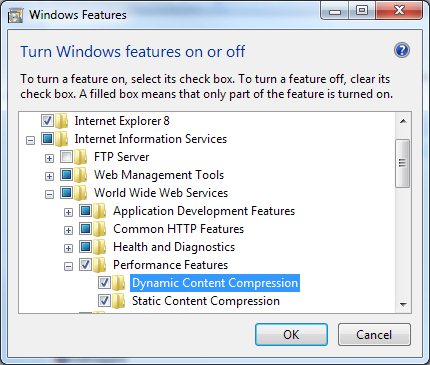 You can confirm this setting is correct inside IIS Manager by double clicking the Compression module for the website and seeing that Enable dynamic content compression is checked and not grayed out: 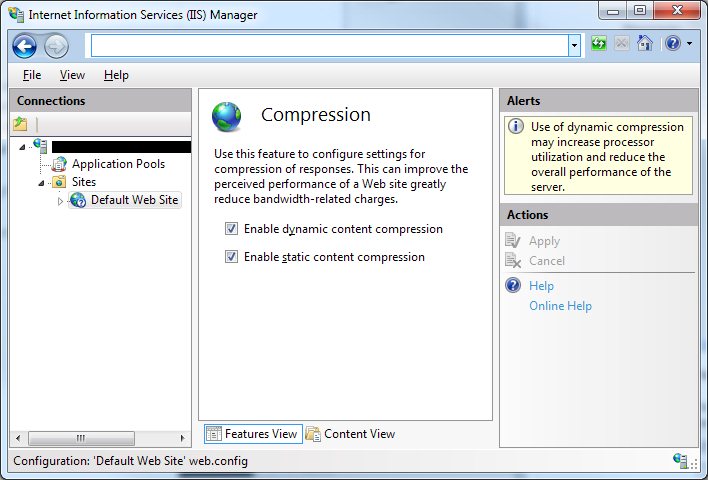 |
|
|
|
|
rgillingham
Newbie
Joined: 23-Aug-2010 Location: UK Posts: 5 |
Post Options
Quote Reply
Posted: 07-Feb-2011 at 12:45pm |
|
Hi
I added this to web.config <system.webServer> <httpCompression directory="%SystemDrive%\inetpub\ temp\IIS Temporary Compressed Files"> <scheme name="gzip" dll="%Windir%\system32\inetsrv\gzip.dll"/> <dynamicTypes> <add mimeType="text/*" enabled="true"/> <add mimeType="message/*" enabled="true"/> <add mimeType="application/javascript" enabled="true"/> <add mimeType="application/soap+msbin1" enabled="true"/> <add mimeType="*/*" enabled="false"/> </dynamicTypes> <staticTypes> <add mimeType="text/*" enabled="true"/> <add mimeType="message/*" enabled="true"/> <add mimeType="application/javascript" enabled="true"/> <add mimeType="*/*" enabled="false"/> <add mimeType="application/soap+msbin1" enabled="true"/> </staticTypes> </httpCompression> <urlCompression doStaticCompression="true" doDynamicCompression="true"/> </system.webServer> It didn't make any difference - the content type being returned is application/soap+msbin1 according to Fiddler Richard |
|
|
|
|
ting
IdeaBlade
Joined: 27-Mar-2009 Location: San Francisco Posts: 427 |
Post Options
Quote Reply
Posted: 07-Feb-2011 at 12:03pm |
|
We have an open feature request to enable compression by default for DevForce Silverlight applications. (It is already enabled for WPF/WinForms apps, but Silverlight uses a different .NET runtime CLR.) Until then, you can manually turn on compression in IIS for your application. This is one link that shows how to do it for IIS 7: Let us know if that works for you. |
|
|
|
|
rgillingham
Newbie
Joined: 23-Aug-2010 Location: UK Posts: 5 |
Post Options
Quote Reply
Posted: 04-Feb-2011 at 3:41am |
|
Hi
We have a simple silverlight devforce 2010 application. We have just used the default configuration out of the box and hosting under IIS. Using Fiddler we are seeing that a query we are executing is returning 460K back to the silverlight client uncompressed. It is telling us that this would reduce to 39K using gzip compression. What are the simple steps to configuring devforce to use gzip compression - there is some informaiton on the Wiki but we can't see how to apply this - or not seeing any effects. Thanks in advance Richard |
|
|
|

|
Post Reply
|
| Forum Jump | Forum Permissions You cannot post new topics in this forum You cannot reply to topics in this forum You cannot delete your posts in this forum You cannot edit your posts in this forum You cannot create polls in this forum You cannot vote in polls in this forum |