

|


Wierd BOS Behaviour |
Post Reply 
|
Page 12> |
| Author |
 Share Topic Share Topic Printable Version Printable Version Delicious Delicious Digg Digg Facebook Facebook Furl Furl Google Boomarks Google Boomarks Google Buzz Google Buzz MySpace MySpace Newsvine Newsvine reddit reddit StumbleUpon Translate StumbleUpon Translate Twitter Twitter Windows Live Windows Live Yahoo Bookmarks Yahoo Bookmarks Topic Search Topic Search  Topic Options Topic Options
|
sbelini 
IdeaBlade 

Joined: 13-Aug-2010 Location: Oakland Posts: 786 |
 Post Options Post Options
 Quote Reply Quote Reply
 Topic: Wierd BOS Behaviour Topic: Wierd BOS BehaviourPosted: 24-Jan-2013 at 3:04pm |
|
Zbynek,
The error message you now provided is different than in your previous post. You will find useful information about troubleshooting IIS issues at http://drc.ideablade.com/devforce-2012/bin/view/Documentation/troubleshooting-iis. sbelini. |
|
 |
|
|
zbynek
Newbie 
Joined: 22-Jan-2013 Posts: 2 |
Post Options
Quote Reply
Posted: 23-Jan-2013 at 12:32am |
|
The preview Exception message is from Event Log. Next one exception message is in Application Event Log: WebHost failed to process a request. Sender Information: System.ServiceModel.Activation.HostedHttpRequestAsyncResult/28796587 Exception: System.Web.HttpException (0x80004005): There was no channel actively listening at 'https://rd00155d3615a9/EntityService.svc/sl'. This is often caused by an incorrect address URI. Ensure that the address to which the message is sent matches an address on which a service is listening. ---> System.ServiceModel.EndpointNotFoundException: There was no channel actively listening at 'https://rd00155d3615a9/EntityService.svc/sl'. This is often caused by an incorrect address URI. Ensure that the address to which the message is sent matches an address on which a service is listening. at System.ServiceModel.Activation.HostedHttpTransportManager.HttpContextReceived(HostedHttpRequestAsyncResult result) at System.ServiceModel.Activation.HostedHttpRequestAsyncResult.HandleRequest() at System.ServiceModel.Activation.HostedHttpRequestAsyncResult.BeginRequest() at System.Runtime.AsyncResult.End[TAsyncResult](IAsyncResult result) at System.ServiceModel.Activation.HostedHttpRequestAsyncResult.End(IAsyncResult result) Process Name: w3wp Process ID: 4968 I do not know where it takes https://rd00155d3615a9/EntityService.svc/sl In our application we get this Error Message: 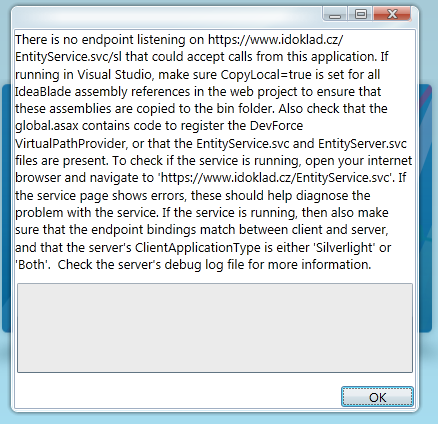 Zbyněk
|
|
|
|
|
sbelini
IdeaBlade
Joined: 13-Aug-2010 Location: Oakland Posts: 786 |
Post Options
Quote Reply
Posted: 22-Jan-2013 at 2:17pm |
|
Zbynek,
In the error message you provided, like in the original, the error occurring seems to be happening in a service other than DevForce's. (i.e. service.svc) In your app is there any other services trying to use DevForce? This ended up being what was causing the issue for Vonzkie. (as stated above) If that's not the case, then we could try to take a look at the Client and Server debugLogs, and client config files in order to try to poinpoint the issue. However, bear in mind that if the these files resemble the ones provided in the original post, then a reproducible test case will be necessary. sbelini. |
|
|
|
|
zbynek
Newbie
Joined: 22-Jan-2013 Posts: 2 |
Post Options
Quote Reply
Posted: 22-Jan-2013 at 1:34pm |
|
Hi, I have the similar troubles. Can you tell me the solution? Thanks for your help. Best regards Zbyněk Šulc WebHost failed to process a request. Sender Information:
System.ServiceModel.Activation.HostedHttpRequestAsyncResult/18207770 Exception: System.Web.HttpException (0x80004005): The service
'/service.svc' does not exist. --->
System.ServiceModel.EndpointNotFoundException: The service '/service.svc' does
not exist. at
System.ServiceModel.ServiceHostingEnvironment.HostingManager.EnsureServiceAvailable(String
normalizedVirtualPath) at
System.ServiceModel.ServiceHostingEnvironment.EnsureServiceAvailableFast(String
relativeVirtualPath) at
System.ServiceModel.Activation.HostedHttpRequestAsyncResult.HandleRequest() at System.ServiceModel.Activation.HostedHttpRequestAsyncResult.BeginRequest() at
System.Runtime.AsyncResult.End[TAsyncResult](IAsyncResult result) at
System.ServiceModel.Activation.HostedHttpRequestAsyncResult.End(IAsyncResult
result) Process Name: w3wp Process ID: 4968 |
|
|
|
|
sbelini
IdeaBlade
Joined: 13-Aug-2010 Location: Oakland Posts: 786 |
Post Options
Quote Reply
Posted: 06-Jun-2012 at 12:14pm |
|
Hi Von,
A service using DevForce shouldn't raise a problem. Most likely, something in code is causing the adverse effect. Once again, our Professional Services team would be able to assist you in accomplishing your goal. Regards, Silvio.
|
|
|
|
|
Vonzkie
Senior Member 

Joined: 01-Aug-2011 Location: PH Posts: 133 |
Post Options
Quote Reply
Posted: 05-Jun-2012 at 7:00pm |
|
Hi,
We already fixed the issue. :) I take note of your number 5 question whether we're using Devforce in our WCF service and yes we are, we removed it by using the Devforce in the client side instead of a service that is also using Devforce. Actually the primary purpose supposedly by our approach is to increase performance by eliminating the client side initialization (probing) of the EntityManager w/c has a delay because of the huge content of the Model. My question would be, why is there a problem when a service is also using Devforce? THanks, Von
|
|
|
|
|
sbelini
IdeaBlade
Joined: 13-Aug-2010 Location: Oakland Posts: 786 |
Post Options
Quote Reply
Posted: 04-Jun-2012 at 12:13pm |
|
Von,
We have done a fair amount of research/investigation on your issue and could not repro nor find out what could be causing it. We have never seen the issue where the endpoint fails to be created and believe that most likely DevForce is not at fault. In order to help any further we will need a reproducible test case so we can verify if this is indeed a DevForce issue or not. Also, if you want us to debug your application to find out what's causing the issue, I can introduce you to our Professional Services team and they will work with you in this regard. Silvio. |
|
|
|
|
Vonzkie
Senior Member
Joined: 01-Aug-2011 Location: PH Posts: 133 |
Post Options
Quote Reply
Posted: 03-Jun-2012 at 9:37pm |
|
Hi Silvio,
1. Perhaps I have given the wrong log file here.. (try to send again later) :( 2. On what instance does that happened? 3. There are no special codes on our ServiceHostEvents.. Just calling the base.Something here... 4. This is actually weird. 5. Yes, we have a service that is using Devforce. Thanks, Von
|
|
|
|
|
sbelini
IdeaBlade
Joined: 13-Aug-2010 Location: Oakland Posts: 786 |
Post Options
Quote Reply
Posted: 01-Jun-2012 at 4:24pm |
|
Von,
1) I am confused. By comparing the server logs (non-working: provided on May-29-2012 at 2:57am; and working: provided on May-31-2012 at 9:08pm) I noticed that the app path is not the same: The non-working log points to D:\TFS\70_VisionCore\iRely Suite\Global
Components\iRely.BusinessObjectServer while the working log points to C:\inetpub\wwwroot\iRely.BusinessObjectServer Can you clarify? 2) Also, we noticed that in the non-working log probing is oddly happening twice: =========================================================================== 2012-05-29 10:09:42 IdeaBlade.Core.Composition.PartsCatalog:LoadCatalog MEF assembly probing started: 5/29/2012 10:09:42 AM. If this takes a long time, use IdeaBlade.Core.Composition.CompositionHost to specify/restrict which assemblies to probe. 2012-05-29 10:09:42 IdeaBlade.EntityModel.Server.EntityServiceHost:AddBehaviors Using DC serializer for EntityService 2012-05-29 10:09:42 IdeaBlade.Core.Composition.PartsCatalog:LoadCatalog Error loading assembly 'D:\TFS\70_VisionCore\iRely Suite\Global Components\iRely.BusinessObjectServer\bin\ActiveDatabaseSoftware.ActiveQueryBuilder.dll' for PartsCatalog: Could not load type 'Deflate.Attributes.TargetFrameworkAttribute' from assembly 'ActiveDatabaseSoftware.ActiveQueryBuilder, Version=1.16.1.342, Culture=neutral, PublicKeyToken=3cbcbcc9bf57ecde'. 2012-05-29 10:09:42 IdeaBlade.Core.Composition.PartsCatalog:LoadCatalog Error loading assembly 'D:\TFS\70_VisionCore\iRely Suite\Global Components\iRely.BusinessObjectServer\bin\ActiveDatabaseSoftware.ExpressionEditor.dll' for PartsCatalog: Could not load type 'Deflate.Attributes.TargetFrameworkAttribute' from assembly 'ActiveDatabaseSoftware.ExpressionEditor, Version=1.16.1.342, Culture=neutral, PublicKeyToken=3cbcbcc9bf57ecde'. 2012-05-29 10:09:42 IdeaBlade.Core.Composition.PartsCatalog:LoadCatalog Error loading assembly 'D:\TFS\70_VisionCore\iRely Suite\Global Components\iRely.BusinessObjectServer\bin\ActiveDatabaseSoftware.MSSQLMetadataProvider.dll' for PartsCatalog: Could not load type 'Deflate.Attributes.TargetFrameworkAttribute' from assembly 'ActiveDatabaseSoftware.MSSQLMetadataProvider, Version=1.16.1.342, Culture=neutral, PublicKeyToken=3cbcbcc9bf57ecde'. 2012-05-29 10:09:43 IdeaBlade.Core.Composition.PartsCatalog:LoadCatalog Assembly 'iRely.ConnectionManager, Version=11.0.0.0, Culture=neutral, PublicKeyToken=null' added to PartsCatalog 2012-05-29 10:09:43 IdeaBlade.Core.Composition.PartsCatalog:LoadCatalog Assembly 'iRely.i21Manager.BRL, Version=11.0.0.0, Culture=neutral, PublicKeyToken=null' added to PartsCatalog 2012-05-29 10:09:43 IdeaBlade.Core.Composition.PartsCatalog:LoadCatalog Assembly 'iRely.Petrolac.TankManagement.BRL, Version=11.0.0.0, Culture=neutral, PublicKeyToken=null' added to PartsCatalog 2012-05-29 10:09:43 IdeaBlade.Core.Composition.PartsCatalog:LoadCatalog MEF assembly probing completed: 5/29/2012 10:09:43 AM =========================================================================== and =========================================================================== 2012-05-29 10:09:43 IdeaBlade.Core.Composition.PartsCatalog:LoadCatalog MEF assembly probing started: 5/29/2012 10:09:43 AM. If this takes a long time, use IdeaBlade.Core.Composition.CompositionHost to specify/restrict which assemblies to probe. 2012-05-29 10:09:44 IdeaBlade.Core.Composition.PartsCatalog:LoadCatalog Error loading assembly 'D:\TFS\70_VisionCore\iRely Suite\Global Components\iRely.BusinessObjectServer\bin\ActiveDatabaseSoftware.ActiveQueryBuilder.dll' for PartsCatalog: Could not load type 'Deflate.Attributes.TargetFrameworkAttribute' from assembly 'ActiveDatabaseSoftware.ActiveQueryBuilder, Version=1.16.1.342, Culture=neutral, PublicKeyToken=3cbcbcc9bf57ecde'. 2012-05-29 10:09:44 IdeaBlade.Core.Composition.PartsCatalog:LoadCatalog Error loading assembly 'D:\TFS\70_VisionCore\iRely Suite\Global Components\iRely.BusinessObjectServer\bin\ActiveDatabaseSoftware.ExpressionEditor.dll' for PartsCatalog: Could not load type 'Deflate.Attributes.TargetFrameworkAttribute' from assembly 'ActiveDatabaseSoftware.ExpressionEditor, Version=1.16.1.342, Culture=neutral, PublicKeyToken=3cbcbcc9bf57ecde'. 2012-05-29 10:09:44 IdeaBlade.Core.Composition.PartsCatalog:LoadCatalog Error loading assembly 'D:\TFS\70_VisionCore\iRely Suite\Global Components\iRely.BusinessObjectServer\bin\ActiveDatabaseSoftware.MSSQLMetadataProvider.dll' for PartsCatalog: Could not load type 'Deflate.Attributes.TargetFrameworkAttribute' from assembly 'ActiveDatabaseSoftware.MSSQLMetadataProvider, Version=1.16.1.342, Culture=neutral, PublicKeyToken=3cbcbcc9bf57ecde'. 2012-05-29 10:09:44 IdeaBlade.Core.Composition.PartsCatalog:LoadCatalog Assembly 'iRely.ConnectionManager, Version=11.0.0.0, Culture=neutral, PublicKeyToken=null' added to PartsCatalog 2012-05-29 10:09:44 IdeaBlade.Core.Composition.PartsCatalog:LoadCatalog Assembly 'iRely.i21Manager.BRL, Version=11.0.0.0, Culture=neutral, PublicKeyToken=null' added to PartsCatalog 2012-05-29 10:09:44 IdeaBlade.Core.Composition.PartsCatalog:LoadCatalog Assembly 'iRely.Petrolac.TankManagement.BRL, Version=11.0.0.0, Culture=neutral, PublicKeyToken=null' added to PartsCatalog 2012-05-29 10:09:44 IdeaBlade.Core.Composition.PartsCatalog:LoadCatalog MEF assembly probing completed: 5/29/2012 10:09:44 AM =========================================================================== while it only happens once in the working log: =========================================================================== 2012-05-31 21:51:28 IdeaBlade.Core.Composition.PartsCatalog:LoadCatalog MEF assembly probing started: 5/31/2012 9:51:28 PM. If this takes a long time, use IdeaBlade.Core.Composition.CompositionHost to specify/restrict which assemblies to probe. 2012-05-31 21:51:28 IdeaBlade.Core.Composition.PartsCatalog:LoadCatalog Assembly 'iRely.ConnectionManager, Version=11.0.0.0, Culture=neutral, PublicKeyToken=null' added to PartsCatalog 2012-05-31 21:51:28 IdeaBlade.Core.Composition.PartsCatalog:LoadCatalog Assembly 'iRely.i21Manager.BRL, Version=11.0.0.0, Culture=neutral, PublicKeyToken=null' added to PartsCatalog 2012-05-31 21:51:28 IdeaBlade.Core.Composition.PartsCatalog:LoadCatalog MEF assembly probing completed: 5/31/2012 9:51:28 PM =========================================================================== 3) Can we take a look at your ServiceHostEvents? Also, note that it is only present in the working log. 4) We also noticed that in the non-working log EntityService doesn't start properly as there is no endpoint: 2012-05-29 10:09:44 IdeaBlade.EntityModel.Server.EntityServiceHostFactory:CreateServiceHost Error: No endpoint addresses found for EntityService So I'm wondering how it worked in the first place. What operations were you able to perform before it stopped working? 5) Does any of your other services try to use DevForce? This is just a guess, but maybe this might shed some light on why the different initialization paths as in both debug logs. Silvio.
|
|
|
|
|
Vonzkie
Senior Member
Joined: 01-Aug-2011 Location: PH Posts: 133 |
Post Options
Quote Reply
Posted: 01-Jun-2012 at 12:25am |
|
Another thing that might help is my code in Global.asax, our code is:
<script language="C#" runat="server"> /// <summary> /// Perform application start activities. /// </summary> protected void Application_Start(Object sender, EventArgs e) { IdeaBlade.Core.Composition.CompositionHost.SearchPatterns.Clear(); IdeaBlade.Core.Composition.CompositionHost.SearchPatterns.Add("iRely.Model.dll"); IdeaBlade.Core.Composition.CompositionHost.SearchPatterns.Add("iRely.ConnectionManager.dll"); IdeaBlade.Core.Composition.CompositionHost.SearchPatterns.Add("*.Model.dll"); IdeaBlade.Core.Composition.CompositionHost.SearchPatterns.Add("*.BRL.dll"); // To enable remote viewing of trace messages via the TraceViewer: // TODO: Uncomment following line if you want to provide this feature. //IdeaBlade.Core.TracePublisher.LocalInstance.MakeRemotable(); // If you don't want to create a .svc file for every EntityServer service, you // can instead register a "virtual path provider". // You do not need to supply .svc files for the EntityService and EntityServer services // when the provider is registered. var service = new IdeaBlade.EntityModel.Web.ServiceVirtualPathProvider(); service.InitializeLifetimeService(); System.Web.Hosting.HostingEnvironment.RegisterVirtualPathProvider(service); } </script> This is the default code given by devforce: <script language="C#" runat="server"> /// <summary> /// Perform application start activities. /// </summary> protected void Application_Start(Object sender, EventArgs e) { // To enable remote viewing of trace messages via the TraceViewer: // TODO: Uncomment following line if you want to provide this feature. //IdeaBlade.Core.TracePublisher.LocalInstance.MakeRemotable(); // If you don't want to create a .svc file for every EntityServer service, you // can instead register a "virtual path provider". // You do not need to supply .svc files for the EntityService and EntityServer services // when the provider is registered. System.Web.Hosting.HostingEnvironment.RegisterVirtualPathProvider(new IdeaBlade.EntityModel.Web.ServiceVirtualPathProvider()); } </script> Noticed the Service part
|
|
|
|
|
Vonzkie
Senior Member
Joined: 01-Aug-2011 Location: PH Posts: 133 |
Post Options
Quote Reply
Posted: 31-May-2012 at 9:08pm |
|
Hi, Here's the server log of the one that is working and the one that is not. What I noticed is that when we try to open our application that is accessing Devforce and try to close the application and wait for about more or less 20 mins (idle) then try to open again, we we're now unable to instantiate our EntityManager. I don't know what is the problem here and we really need to know why this is happening. After restarting IIS or just simply overwritting the model files in the bin folder by the same file the application will again work. Note: You will see on the log file of the one that's working at the bottom that the EntityServer is shutdown and we're unable to connect to it. This is very weird and we really need assistance here. Let me know if when is the best time for you guys to help troubleshoot our server. Thanks, Von
|
|
|
|
|
sbelini
IdeaBlade
Joined: 13-Aug-2010 Location: Oakland Posts: 786 |
Post Options
Quote Reply
Posted: 29-May-2012 at 2:15pm |
|
Hi Von,
We could see in your server log that the EntityService is not being properly initialized as there is not endpoint (from the log: 2012-05-29 10:09:44 IdeaBlade.EntityModel.Server.EntityServiceHostFactory:CreateServiceHost Error: No endpoint addresses found for EntityService) We are still unsure about what could be causing it. What is the base address of your web app? In your deployment, is there anything out of the ordinary that you think might be a cause of this issue? Also, you mention that this occurs intermittently. So could you send us your debug log of when everything is working well, so we can cross compare and maybe find what is going wrong? Regards, Silvio.
|
|
|
|
|
Vonzkie
Senior Member
Joined: 01-Aug-2011 Location: PH Posts: 133 |
Post Options
Quote Reply
Posted: 29-May-2012 at 2:57am |
|
Hi, Thanks, Von
|
|
|
|
|
Vonzkie
Senior Member
Joined: 01-Aug-2011 Location: PH Posts: 133 |
Post Options
Quote Reply
Posted: 28-May-2012 at 1:59am |
|
Hi,
Is this kind of datasourcekey may cause a problem? www.i21server.com$i21portal.web_47_12 I'll send client and server logs when the error will occur again because it is intermittent.. Thanks, Von
|
|
|
|
|
sbelini
IdeaBlade
Joined: 13-Aug-2010 Location: Oakland Posts: 786 |
Post Options
Quote Reply
Posted: 21-May-2012 at 12:52pm |
|
Von,
Please attach your DatasourceKeyResolver, Client and Server debugLogs. Silvio.
|
|
|
|
|
Vonzkie
Senior Member
Joined: 01-Aug-2011 Location: PH Posts: 133 |
Post Options
Quote Reply
Posted: 21-May-2012 at 2:08am |
|
Hi,
1. Yes actually in all clients that will connect, when it works, it works for all, when it fail, it fail for all without knowing why.. 2. Unfortunately there are no definite steps to follow.. But I noticed something that might help, in the event viewer, i have something like this: A worker process with process id of '6896' serving application pool 'ASP.NET V4.0 Integrated' was shutdown due to inactivity. Application Pool timeout configuration was set to 20 minutes. A new worker process will be started when needed. I restarted the pool only and it works.. I tried to extend the time out config to 30 minutes but still the weird error occurs. Thanks, Von |
|
|
|

|
Post Reply
|
Page 12> |
| Forum Jump | Forum Permissions You cannot post new topics in this forum You cannot reply to topics in this forum You cannot delete your posts in this forum You cannot edit your posts in this forum You cannot create polls in this forum You cannot vote in polls in this forum |