

|


Push feature on Winforms |
Post Reply 
|
| Author |
 Share Topic Share Topic Printable Version Printable Version Delicious Delicious Digg Digg Facebook Facebook Furl Furl Google Boomarks Google Boomarks Google Buzz Google Buzz MySpace MySpace Newsvine Newsvine reddit reddit StumbleUpon Translate StumbleUpon Translate Twitter Twitter Windows Live Windows Live Yahoo Bookmarks Yahoo Bookmarks Topic Search Topic Search  Topic Options Topic Options
|
kimj 
IdeaBlade 

Joined: 09-May-2007 Posts: 1391 |
 Post Options Post Options
 Quote Reply Quote Reply
 Topic: Push feature on Winforms Topic: Push feature on WinformsPosted: 14-Nov-2011 at 3:22pm |
|
Hi Lawrence, To use Push in DevForce you do have to tell the server that you want it, so that it sets up the appropriate endpoint(s) to listen on. You can do this by adding one simple setting within the ideablade.configuration section of the web.config: <notificationService enabled="true" /> This is sufficient to allow DevForce to set up the Push service with all defaults in place. On the client side in a WinClient application you also have to provide the client-side port which will be "listening" for messages from the server. You do this in your app.config as follows (port 9012 is just used as an example): <notificationService clientPort="9012" /> The WPF sample shows this configuration and you can find out more here.
|
|
 |
|
|
sbelini
IdeaBlade

Joined: 13-Aug-2010 Location: Oakland Posts: 786 |
Post Options
Quote Reply
Posted: 14-Nov-2011 at 8:57am |
|
Thanks Lawrence,
I'm taking a look at you sample and will follow up shortly. Silvio.
|
|
|
|
|
wackywhizz
Newbie 

Joined: 25-Aug-2011 Location: Philippines Posts: 8 |
Post Options
Quote Reply
Posted: 14-Nov-2011 at 2:12am |
|
Hi Silvio,
I'm still receiving the errors. I've attached a new one I created trying to fix it by creating an all new project. Still I seem to get the same error. I've attached the project together with a screenshot of the exception I've been experiencing. 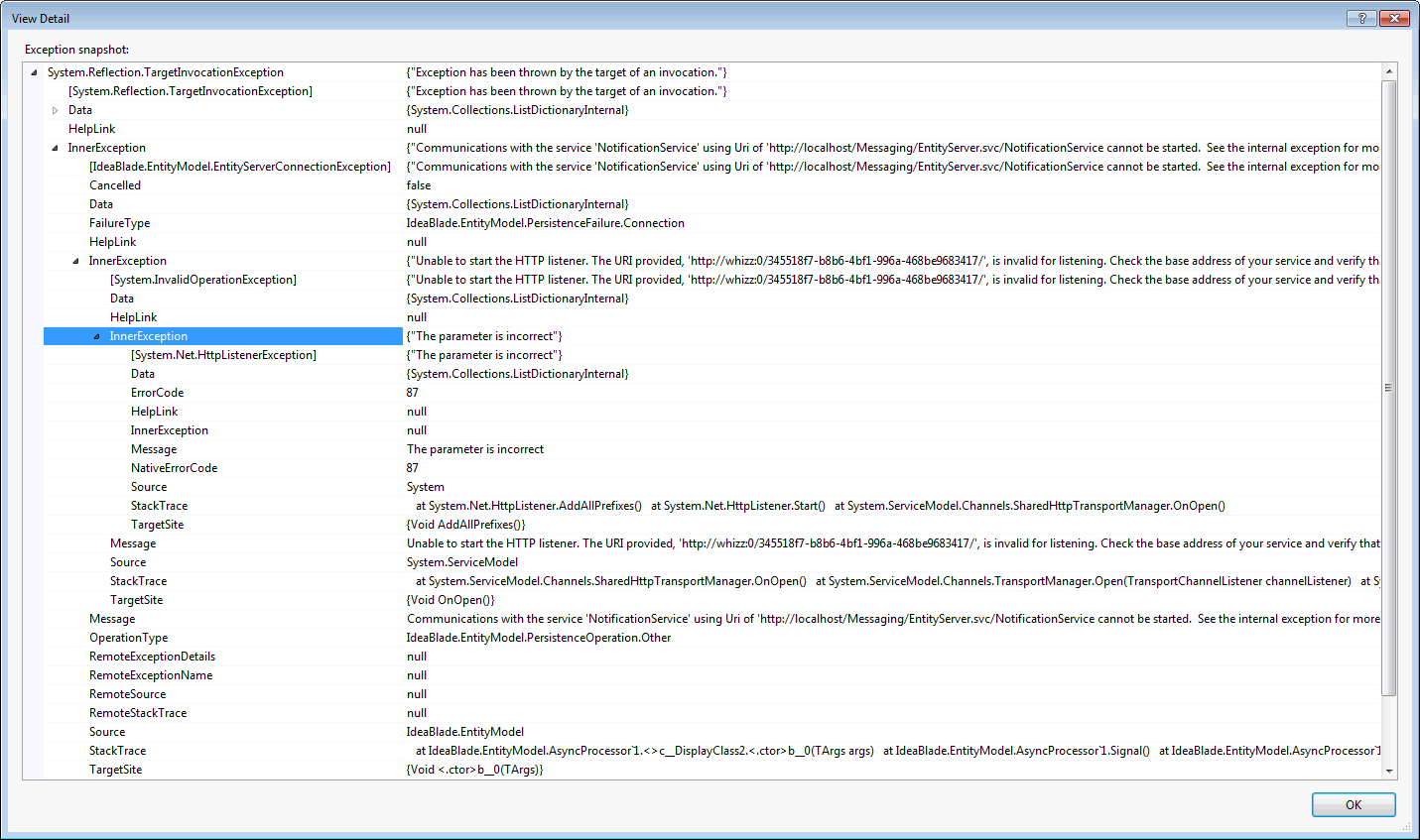 Thanks, Lawrence
|
|
|
|
|
sbelini
IdeaBlade
Joined: 13-Aug-2010 Location: Oakland Posts: 786 |
Post Options
Quote Reply
Posted: 09-Sep-2011 at 8:58am |
|
Hi Lawrence,
I haven't added any additional assemblies. I'm sending your sample back with the changes I made, so you can take a closer look. (note that I changed the connection string to match my datasource) You can download it at uploads/892/WinFormsPush.zip Regards, Silvio.
Edited by sbelini - 09-Sep-2011 at 8:59am |
|
|
|
|
wackywhizz
Newbie
Joined: 25-Aug-2011 Location: Philippines Posts: 8 |
Post Options
Quote Reply
Posted: 08-Sep-2011 at 7:39pm |
|
Hi Silvio,
I already have the notification service enabled and I did what you said about using the correct signature of the ServerNotifyDelegate, but I still experience the exception has been thrown error.. Is there maybe any additional assemblies that I need to add into my project? Thanks, Lawrence Edited by wackywhizz - 08-Sep-2011 at 8:51pm |
|
|
|
|
sbelini
IdeaBlade
Joined: 13-Aug-2010 Location: Oakland Posts: 786 |
Post Options
Quote Reply
Posted: 08-Sep-2011 at 6:59pm |
|
Lawrence,
The issue is that the method signature does not conform to the ServerNotifyDelegate. You have: [AllowRpc] public static void NewMessage(Guid key, INotificationManager mMgr, DAL.DFModel eMgr) but you should have instead: [AllowRpc] public static void NewMessage(Guid key, INotificationManager mMgr, EntityManager eMgr) You can later create a sub-typed entity manager: entityMgr = new DFModel(eMgr); Also, be sure to enable the notificationService in the server (i.e. web.config file): <notificationService enabled="true" /> Regards, Silvio.
|
|
|
|
|
sbelini
IdeaBlade
Joined: 13-Aug-2010 Location: Oakland Posts: 786 |
Post Options
Quote Reply
Posted: 08-Sep-2011 at 5:26pm |
|
Hi Lawrence,
I'm taking a look at your project and will follow up shortly. Silvio.
|
|
|
|
|
wackywhizz
Newbie
Joined: 25-Aug-2011 Location: Philippines Posts: 8 |
Post Options
Quote Reply
Posted: 07-Sep-2011 at 3:24am |
|
Hi Silvio,
I read the documents and also downloaded the SL sample code for the push service. I then tried to create a winform counterpart and I'm having a "Exception has been thrown by the target of an invocation" error. Can you help me with this..? Here is my project file: http://dl.dropbox.com/u/40770720/WinFormsPush.rar Here is a screenshot of my error: http://dl.dropbox.com/u/40770720/exception.png Thanks, Lawrence |
|
|
|
|
sbelini
IdeaBlade
Joined: 13-Aug-2010 Location: Oakland Posts: 786 |
Post Options
Quote Reply
Posted: 25-Aug-2011 at 5:21pm |
|
Hi Lawrence,
You could use the DomainModel project if you are simply trying to create a sample using NorthwindIB. If you take a closer look, the push notification feature is very much alike in both SL and WPF samples. Basically, all you need is: 1- Define a push service; (i.e. use [AllowRpc] and method signature conforming to ServerNotifyDelegate) 2- Subscribe to it; (RegisterCallback method) 3- Configure it. (in the server and client config files) You will find detailed information about the Push notification in the DevForce Resource Center. Silvio.
|
|
|
|
|
wackywhizz
Newbie
Joined: 25-Aug-2011 Location: Philippines Posts: 8 |
Post Options
Quote Reply
Posted: 25-Aug-2011 at 4:57pm |
|
Hi Silvio,
Can you point me to the right direction as to how do I start trying this feature out..? I have copies of both sample codes for Silverlight and WPF but I was thinking of creating a win app from scratch? Would you recommend me to use some of the existing projects from the sample code I downloaded? Thanks, Lawrence
|
|
|
|
|
sbelini
IdeaBlade
Joined: 13-Aug-2010 Location: Oakland Posts: 786 |
Post Options
Quote Reply
Posted: 25-Aug-2011 at 9:42am |
|
Hi wackywhizz,
Although there isn't an specific Winforms sample using Push notification, the concept is the same and you should be able to implement it in a Winforms app. Silvio.
|
|
|
|
|
wackywhizz
Newbie
Joined: 25-Aug-2011 Location: Philippines Posts: 8 |
Post Options
Quote Reply
Posted: 25-Aug-2011 at 3:14am |
|
I've seen samples and codes about the PUSH feature but they're just on WPF and SL. Is it just because there are just no samples available for Winforms or is it that this PUSH feature is not available on Winforms?
|
|
|
|

|
Post Reply
|
| Forum Jump | Forum Permissions You cannot post new topics in this forum You cannot reply to topics in this forum You cannot delete your posts in this forum You cannot edit your posts in this forum You cannot create polls in this forum You cannot vote in polls in this forum |