

|


Getting Started (Cabana SQL Server Login Issue) |
Post Reply 
|
| Author |
 Share Topic Share Topic Printable Version Printable Version Delicious Delicious Digg Digg Facebook Facebook Furl Furl Google Boomarks Google Boomarks Google Buzz Google Buzz MySpace MySpace Newsvine Newsvine reddit reddit StumbleUpon Translate StumbleUpon Translate Twitter Twitter Windows Live Windows Live Yahoo Bookmarks Yahoo Bookmarks Topic Search Topic Search  Topic Options Topic Options
|
Bill Jensen 
IdeaBlade 

Joined: 31-Jul-2007 Location: United States Posts: 229 |
 Post Options Post Options
 Quote Reply Quote Reply
 Topic: Getting Started (Cabana SQL Server Login Issue) Topic: Getting Started (Cabana SQL Server Login Issue)Posted: 14-Dec-2007 at 3:56pm |
|
Hi Ray,
The default implementation (in Cabana and applications created with the Application Wizard) uses windows authentication. It doesn't prompt for a username/password on the client side and passes a null username in the credentials. This causes the LoginManager to attempt to authenticate the current windows Id (HSDOMAIN1\Ray).
In DEBUG mode, the UserLoginFilter() method translates special users (me and Ward) to specific user ids (we use this for demo purposes) and everything else to "guest".
"guest" is supposed to be an authorized user in the IdeaBlade Tutorial database. You can use SQL Server Enterprise Manager or Management Studio to check that the SecurityUser table exists and that it contains a row for the "guest" user.
See my response to Gus in this thread:
for an overview of the user login, authentication and authorization process.
Let me know if you need more help.
Thanks,
Bill Jensen
IdeaBlade
|
|
 |
|
|
rayn
Newbie 
Joined: 07-Dec-2007 Posts: 6 |
Post Options
Quote Reply
Posted: 10-Dec-2007 at 7:40am |
The routine protected virtual ILoginCredential was authenticating me...but it was passing empty strings into the call LoginCredential. If I were planning to build an app that would authenticate on my domain, I could parse the values in wid.Name to get the login name and domain...but what about that password variable? NOTE: My connection string ended up looking like this: <connection>Provider=SQLOLEDB.1;Integrated Security=SSPI;Persist Security Info=False;Initial Catalog=IdeaBladeTutorial;Data Source=MyComputersHostName;User ID=sa;Password=theSaPassword</connection> I had to change the connection provider back to its original value. |
|
|
|
|
Linguinut
Senior Member 

Joined: 14-Jun-2007 Location: United States Posts: 394 |
Post Options
Quote Reply
Posted: 07-Dec-2007 at 12:57pm |
|
Look at the AppAuthenticationService (Foundation project). I remember that I had to change how the GetWindowsCredential (or some method similarly named) was handled. It was putting "guest" in there.
Edited by Linguinut - 07-Dec-2007 at 1:00pm |
|
|
|
|
rayn
Newbie
Joined: 07-Dec-2007 Posts: 6 |
Post Options
Quote Reply
Posted: 07-Dec-2007 at 12:45pm |
|
Tutorial database is installed on the default instance. I've tried the following connection strings:
<connection>Provider=System.Data.SqlClient;Integrated Security=SSPI;Persist Security Info=False;Initial Catalog=IdeaBladeTutorial;Data Source=.;User ID=sa;Password=sapassword</connection> <connection>Provider=System.Data.SqlClient;Integrated Security=SSPI;Persist Security Info=False;Initial Catalog=IdeaBladeTutorial;Data Source=MyComputersHostName;User ID=sa;Password=sapassword</connection> Same thing happens as before. In the GetAppIdentity routine in LoginManager.cs, pCredential.UserName comes in as empty string. It goes into UserLoginFilter, does the switch statement on var pUserLoginToFilter (which is value HSDOMAIN1\\Ray) and returns guest. |
|
|
|
|
Linguinut
Senior Member
Joined: 14-Jun-2007 Location: United States Posts: 394 |
Post Options
Quote Reply
Posted: 07-Dec-2007 at 12:21pm |
|
Change "localhost" to the server and instance name. I have successfully used the dot notation (".\INSTANCENAME") however it is not always consistent. For some reason, "localhost" has troubles with connections.
|
|
|
|
|
rayn
Newbie
Joined: 07-Dec-2007 Posts: 6 |
Post Options
Quote Reply
Posted: 07-Dec-2007 at 12:09pm |
|
Here is the new connection string I have for IdeaBlade.ibconfig (items in red represent new or changed values):
<connection>Provider=System.Data.SqlClient;Integrated Security=SSPI;Persist Security Info=False;Initial Catalog=IdeaBladeTutorial;Data Source=localhost;User ID=sa;Password=sapassword</connection> Edited by rayn - 07-Dec-2007 at 12:10pm |
|
|
|
|
davidklitzke
IdeaBlade

Joined: 14-Jun-2007 Posts: 715 |
Post Options
Quote Reply
Posted: 07-Dec-2007 at 11:48am |
|
Congratulations! It looks like you have solved the database part of your problem, we'll now have our Cabana expert look at your login problem.
|
|
|
|
|
rayn
Newbie
Joined: 07-Dec-2007 Posts: 6 |
Post Options
Quote Reply
Posted: 07-Dec-2007 at 11:29am |
|
I did leave out one step.
Between steps 9 and 10, I did manually attach the database, but still could not get it the Cabana project work. I figured there was something more the DevForce installation was doing behind the scenes and, therefore, performed the uninstall. I got an error during the uninstallation about the database being in use and so I just stopped the SQL server service and let it continue. And I bet that was my problem. I never detached the database. I just stopped SQL Server and let the uninstallation delete the datbase from the HD. So, after uninstalling/reinstalling again, it looks like the installation was successful and the database attached successfully. However, I still cannot get the project to run. It's failing to login. In my project, I have opened the IdeaBlad.ibconfig file and added the sa login. However, the app keeps trying to log me in as "guest". Am I chaning the right file? The project seems to ignore what I type. |
|
|
|
|
davidklitzke
IdeaBlade
Joined: 14-Jun-2007 Posts: 715 |
Post Options
Quote Reply
Posted: 07-Dec-2007 at 10:29am |
|
I suspect that the IdeaBlade Tutorial database is not actually empty. When you install DevForce when SQL Server is not running, it should leave the IdeaBladeTutorial MDF and LOG files in the Program Files/IdeaBlade DevForce directory. When you uninstalled DevForce the first time, that should have removed the IdeaBlade database files from your computer. Your reinstall should have worked just fine.
What I think is most likely to have happened is that you had a partial installation of the database. The installation worked well enough that SQL Server sees that there is a database, but it can't see the underlying tables. I do see this problem very rarely. It is almost always some kind of database or database environment related issue.
I believe that your problems are entirely database-related. Your problem has nothing to do with Cabana or DevForce.
At this point, I would recommend any way that you can to get the IdeaBlade Tutorial database attached to your SQL Server 2005 SP 2. Bill may be right. Perhaps just dropping the table and reinstalling may do the trick. However, if that doesn't work, I would try manually attaching the database using SQL Server Management Studio. If you have a DBA, maybe he can help you. Otherwise, send me an email at support@ideablade.com or give a call to Technical Support at (510)-596-5100.
Edited by davidklitzke - 07-Dec-2007 at 10:31am |
|
|
|
|
Linguinut
Senior Member
Joined: 14-Jun-2007 Location: United States Posts: 394 |
Post Options
Quote Reply
Posted: 07-Dec-2007 at 9:41am |
|
You'll probably need to drop the empty database before reinstalling.
After the reinstall, within the solution, open the ibConfig file and verify the database connection. Fix, as necessary. Rebuild, then run the app.
|
|
|
|
|
rayn
Newbie
Joined: 07-Dec-2007 Posts: 6 |
Post Options
Quote Reply
Posted: 07-Dec-2007 at 9:10am |
|
1. Installed (IdeaBlade.DevForce.3.5.5.1.setup.exe)
2. Unzipped CabanaSampleApp 3. Compiled CabanaLib.sln 4. Installed IdeaBlade.Cab.WizardInstaller 5. Opened CabanaDotNetCS.sln 6. Set shell as default project 7. Ran App. 8. got exception: IdeaBlade.Persistence.PersistenceServerException was unhandled by user code Message="[DBNETLIB>[ConnectionOpen (Connect()).>SQL Server does not exist or access denied. 9. Realized SQL Server was not running locally when I installed DevForce(whoops!) 10. Complete Uninstall of IdeaBlade.DevForce.3.5.5.1.setup.exe 11. Started SQL Server 12. Reinstalled IdeaBlade.DevForce.3.5.5.1.setup.exe Still get exception when trying to run CabanaDotNetCS.sln. Database does not show tables when I open it in Management Studio. (see attached image). What can I do to fix this situation so I can run the sample app? 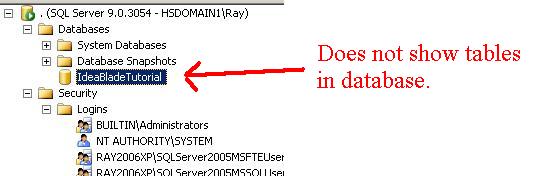
|
|
|
|

|
Post Reply
|
| Forum Jump | Forum Permissions You cannot post new topics in this forum You cannot reply to topics in this forum You cannot delete your posts in this forum You cannot edit your posts in this forum You cannot create polls in this forum You cannot vote in polls in this forum |