

|


Type is not known to serializer |
Post Reply 
|
| Author |
 Share Topic Share Topic Printable Version Printable Version Delicious Delicious Digg Digg Facebook Facebook Furl Furl Google Boomarks Google Boomarks Google Buzz Google Buzz MySpace MySpace Newsvine Newsvine reddit reddit StumbleUpon Translate StumbleUpon Translate Twitter Twitter Windows Live Windows Live Yahoo Bookmarks Yahoo Bookmarks Topic Search Topic Search  Topic Options Topic Options
|
katit 
Senior Member 
Joined: 09-Sep-2011 Posts: 146 |
 Post Options Post Options
 Quote Reply Quote Reply
 Topic: Type is not known to serializer Topic: Type is not known to serializerPosted: 09-Sep-2011 at 8:02pm |
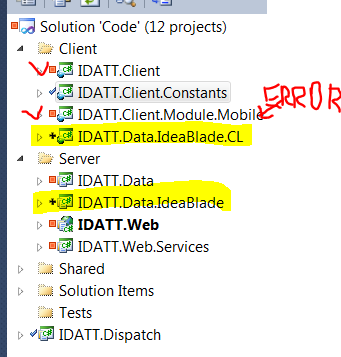 This is PRISM application, so there is some MEF stuff going on. IDATT.Client is a main Shell/Bootstrapper IDATT.Client.Module.Mobile is where I try to load list of "MobileDevice" entities I have IDATT.Data.IdeaBlade.CL referenced from both checked in red projects When I try to load data I get following error. Any suggestion on how to debug it? In my Bootstrapper I added logging and this is what I have. I don't think it is probing additional assemblies that I have referenced..  Edited by katit - 09-Sep-2011 at 8:59pm |
|
 |
|
|
katit
Senior Member
Joined: 09-Sep-2011 Posts: 146 |
Post Options
Quote Reply
Posted: 09-Sep-2011 at 10:49pm |
|
Ok. I fixed that. Wiped Silverlight side data project completely. Created new project, added all references and re-added generated reference. Started to work on CLIENT side (trace really helps there)
I was able to see that license is good and that it found entities, etc. So, this get's really messy when modules/PRISM involved. Since I have many modules and ONE data library - it's best to reference data from main client project and set it to "Copy". Next - I had same issue (Type cannot be found) on a SERVER side!!! That one I didn't solve yet. I created new Web project and added model straight to the web project, everything started to work. I will try to separate Model into separate assembly tomorrow.. Tracing really helps there as well.
|
|
|
|
|
katit
Senior Member
Joined: 09-Sep-2011 Posts: 146 |
Post Options
Quote Reply
Posted: 10-Sep-2011 at 9:09am |
|
Fixed issue with separate library on server side. I THINK - it doesn't work when library name has IdeaBlade in it.
My project was IDATT.Data.IdeaBlade. I'm guessing IdeaBlade filters out it's own name when creates MEF catalog?
|
|
|
|
|
DenisK
IdeaBlade 
Joined: 25-Aug-2010 Posts: 715 |
Post Options
Quote Reply
Posted: 12-Sep-2011 at 5:00pm |
|
Hi katit;
You might have discovered a bug there. We're supposed to only ignore anything with IdeaBlade.*, but apparently in my testing, *.IdeaBlade.* and *.IdeaBlade are being ignored as well. We're going to open a bug report for this. In case you haven't already known, we have the following DRC (DevForce Resource Center) pages that might help you to better understand how DevForce is discovering/probing assemblies. We also have a Prism example with this. Hope this helps.
|
|
|
|
|
katit
Senior Member
Joined: 09-Sep-2011 Posts: 146 |
Post Options
Quote Reply
Posted: 12-Sep-2011 at 5:50pm |
|
Denis,
I already looked at your prism example and I think it's too much of a code in module initialization. I don't want to manually register EVERY type in module. But I'm not sure why you do this in your sample. For me following apprach worked: 1. Main project (with PRISM Shell/Bootstrapper) has reference to my Data project with entities. That allowes IdeaBlade to get everything needed. 2. Every module references same Data project with copy local = false. This works. It requires data to be references from main project but it doesn't require any code. Edited by katit - 12-Sep-2011 at 5:51pm |
|
|
|
|
DenisK
IdeaBlade
Joined: 25-Aug-2010 Posts: 715 |
Post Options
Quote Reply
Posted: 13-Sep-2011 at 11:55am |
|
Hi katit;
I believe the Prism code sample's intention is to demonstrate downloading and launching modules dynamically and on demand. That is why it shows registering the module in code. If you don't have a need to do so, then as you said, your approach will work just fine. |
|
|
|
|
Post Reply
|
| Forum Jump | Forum Permissions You cannot post new topics in this forum You cannot reply to topics in this forum You cannot delete your posts in this forum You cannot edit your posts in this forum You cannot create polls in this forum You cannot vote in polls in this forum |