Upgrade issue to Devforce 2010 6.1.12
Printed From: IdeaBlade
Category: DevForce
Forum Name: DevForce 2010
Forum Discription: For .NET 4.0
URL: http://www.ideablade.com/forum/forum_posts.asp?TID=4063
Printed Date: 13-May-2026 at 5:22am
Topic: Upgrade issue to Devforce 2010 6.1.12
Posted By: PeterProva
Subject: Upgrade issue to Devforce 2010 6.1.12
Date Posted: 20-Mar-2013 at 8:53am
|
Hi guys, I followed up the steps to upgrade my project Silverlight Devforce 2010 6.1.12. I rebuild my Model but unfotunately it still uses 6.1.7 version which was the last version i had it. 1-Is it possible to jump from 6.1.7 to 6.1.12 ? 2-In documents says "1. Regenerate your business model entities (this will not change your custom business logic). " does it mean to rebuild it? Thanks, Peter
|
Replies:
Posted By: sbelini
Date Posted: 20-Mar-2013 at 9:19am
|
Peter,
What exactly do you mean by "still uses 6.1.7 version"? Are the designer classes not being regenerated? You can check and confirm by taking a look in your .IB.Designer.cs file: // -------------------------------------------------------------------- // DO NOT MODIFY THIS CLASS - AutoGenerated Code // Any changes made to this code will be lost the next time this // code is regenerated. // // Generated at: 3/19/2013 17:00:34 // DevForce version: 6.1.12.0 // Template version: 2.1.4 // -------------------------------------------------------------------- Also, be sure to go over the release notes at http://drc.ideablade.com/xwiki/bin/view/Documentation/release-notes - http://drc.ideablade.com/xwiki/bin/view/Documentation/release-notes to find and address all breaking changes from v6.1.7 to v6.1.12. |
Posted By: PeterProva
Date Posted: 20-Mar-2013 at 11:15am
|
Hi sbelini, I solved that problem by deleting all refrences and add new one. Should i do it for any single project in my solution? Is there any upgrade utility so it does for the projects? thx
|
Posted By: sbelini
Date Posted: 20-Mar-2013 at 11:24am
|
You shouldn't have to remove and re-add references.
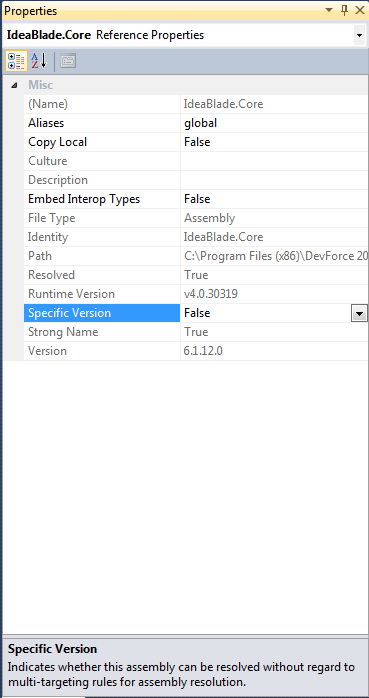
Be sure that Specific Version is set to false in the reference properties. |
Posted By: PeterProva
Date Posted: 20-Mar-2013 at 11:29am
| After i installed the new 6.1.12 i got tons of errors when i looked at the solution most of the projects had ? in front od refrences so i deleted them and ass them again. |
Posted By: PeterProva
Date Posted: 20-Mar-2013 at 11:48am
|
Do i need to install all versions before 6.1.12 (Mine is 6.1.7)? Does 6.1.12 covers all the previous ones? thx
|
Posted By: sbelini
Date Posted: 20-Mar-2013 at 12:11pm
|
You don't need to install all versions.
You should be able to install v6.1.12 on top of v6.1.7 without issues. Note that you MUST ensure that Specific Version in the assembly reference property is set to FALSE. This applies to all DevForce assemblies. If you have the above properly addressed, you shouldn't have any errors related to references. (i.e. the "!" in front of the references) Passed the issue above, you still have to address all the breaking changes that were introduced from 6.1.8 until 6.1.12. You will find these breaking changes in the Release Notes at http://drc.ideablade.com/xwiki/bin/view/Documentation/release-notes - http://drc.ideablade.com/xwiki/bin/view/Documentation/release-notes |
Posted By: PeterProva
Date Posted: 20-Mar-2013 at 1:04pm
|
Thx Sbelini, Can you pls direct me where is Specific Version located? Is it in Solution property My solution has almost 50 projects. Thx
|
Posted By: sbelini
Date Posted: 20-Mar-2013 at 1:34pm
|
Peter,
In the "References" folder, right-click in the assembly reference and select "Properties". You can also select multiple assemblies and right-click/select "Properties". 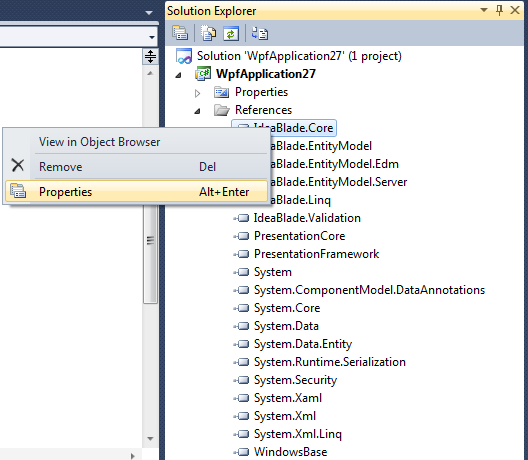
|
Posted By: PeterProva
Date Posted: 21-Mar-2013 at 9:48am
| The reason i upgrade my Devforce to 6.1.12 is to use new fetures.The question is if i Put the Specific version=False am i still be able to use the new features? |
Posted By: PeterProva
Date Posted: 21-Mar-2013 at 9:55am
|
the steps for upgrading the project was as below: 1- I installed 6.1.12. 2-I opened the projects(In solution 5 projects which every single project has his own refences some coming from C:/ProgramFilesX86\DevForce2010\DesktopAssemblies....) 3- I realized some projects refrences have been updated to 6.1.12 and some have not("!").For thos one i changed the Specific verion=true.and rebuild the solution. 4- I also re-generated the Model by refreshing one of the view and save and rebuild the Model. Still i get tons of errors:( Am i missing something? thx
|
Posted By: sbelini
Date Posted: 21-Mar-2013 at 10:09am
|
Peter,
Regarding your first question - Yes, you will be able to use the new features even if you have Specific Version set to False. In fact, I suggest you have Specific Version set to False ALWAYS. Regarding your second question - You are most likely missing many things. Have you been over the breaking changes in the Release Notes? Unless you address all of them you will have errors. After you address all the breaking changes, if you still have errors, provide the error messages so we can evaluate what the issue is. Remember, you must clear all the breaking changes first. |
Posted By: PeterProva
Date Posted: 21-Mar-2013 at 12:49pm
|
Im using Nuget but why Postsharp is involved? Can i just install Devforce 6.1.12 regular way? where is Full ducment of Upgrading ? What is Breaking changes? the link i got http://drc.ideablade.com/xwiki/bin/view/Documentation/release-notes - http://drc.ideablade.com/xwiki/bin/view/Documentation/release-notes just goes to the notes? thx
|
Posted By: sbelini
Date Posted: 21-Mar-2013 at 1:23pm
|
Peter,
Every version of DevForce, might or might not have changes that would need modifications in your code in order to compile - that's why it's called a breaking change. This is a fairly common term in software development. ( http://en.wiktionary.org/wiki/breaking_change - http://en.wiktionary.org/wiki/breaking_change ) If you click in the Release Notes link and look at the left side of the screen, you will see the version numbers. Start at the version next to the one you are using - i.e. you are using v6.1.7, so start at v6.1.8. Click on the version 6.1.8 Release Notes link, check if there are breaking changes. If there are any, the release notes will explain them and indicate how to address them. Once you do that, move to the next version (i.e. 6.1.9) and repeat the process. Do this for every version until you get to the most recent version. I hope this is clear enough for you. Kind regards, sbelini. |
Posted By: PeterProva
Date Posted: 21-Mar-2013 at 2:25pm
|
Thx, Now I figured out i should install 6.1.9 when i go to install it via Package Manager Console PM> Install-Package IdeaBlade.DevForce-2010.Aop -Version 6.1.9 i get this error: RemoveAAssembly : The term 'RemoveAAssembly' is not recognized as the name of a cmdlet, function, script file, or operable program. Check the spelling of the name, or if a path at ... \packages\IdeaBlade.DevForce-2010.Aop.6.1.9\tools\uninstall.ps1:22 char:3 was included, verify that the path is correct and try again RemoveAAssembly : The term 'RemoveAAssembly' is not recognized as the name of a cmdlet, function, script file, or operable program. Check the spelling of the name, or if a path was included, verify that the path is correct and try again RemoveAAssembly : The term 'RemoveAAssembly' is not recognized as the name of a cmdlet, function, script file, or operable program. Check the spelling of the name, or if a path was included, verify that the path is correct and try again. |
Posted By: PeterProva
Date Posted: 22-Mar-2013 at 8:05am
|
Hi again I have 6.1.7 .Lets say if i want to upgrade all of them one by one 6.1.8-6.1.12. where can i find 6.1. and after ?because Thru Nuget just shows the lates 6.1.12. Thanks
|
Posted By: sbelini
Date Posted: 22-Mar-2013 at 9:48am
|
Peter,
The NuGet UI will only show the latest version of DevForce. (and most of other NuGet packages, for that matter) If you want to install previous versions you will have to do so via the Package Manager console using the -Version parameter. Regarding you previous post, if you have DevForce 6.1.12 installed, you should actually install the 6.1.12 NuGet package. |