Model's metadata (csdl, msl, ssdl) could not be found or is invalid
Printed From: IdeaBlade
Category: DevForce
Forum Name: DevForce 2010
Forum Discription: For .NET 4.0
URL: http://www.ideablade.com/forum/forum_posts.asp?TID=1838
Printed Date: 28-Jul-2026 at 11:36am
Topic: Model's metadata (csdl, msl, ssdl) could not be found or is invalid
Posted By: WardBell
Subject: Model's metadata (csdl, msl, ssdl) could not be found or is invalid
Date Posted: 21-May-2010 at 3:44pm
|
Lesson: The EDMX file name must match the EF model's metadata part names
Corollary: If you rename your edmx file, remember to update your connection string.
My Sob Story:
I received the following error when my new app ran its very first query:
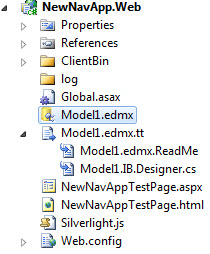
The model's metadata (csdl, msl, ssdl) could not be found or is invalid. This error can also occur if multiple assemblies containing the same metadata are found. Check the connection string for key 'NorthwindIBEntities'. My application solution was simple ... a Silverlight project and a Web project. Only the web assembly could have mattered. Here's a picture of my Web Project in Solution Explorer:
 I looked at the web.config. The connection string - 'NorthwindIBEntities' - was right there!
I opened the Entity Framework Designer and asked it to "Update Model From Database" ... knowing it would have to use this string to find the database. No problem. The string is a valid EF connection string.
I looked at the debug.log ... always one of the first steps to take ... and saw that the server was starting up fine and the client connecting to it just fine. It reported my query attempt and the error message I had received. I inspected my EntityManager in the debugger: yes indeed ... I'm connected and logged in.
What could I be doing wrong?
The Answer Revealed
A keen-eyed colleague figured it out.
Notice that the name of the edmx file is "Model1.edmx". Notice that the EF connection string refers to "NorthwindIB" in the names of the CSDL, SSDL, MSL part files.
Apparently EF doesn't pay attention to this connection string. It always writes the metadata part files using the name of the edmx file. DevForce can't know about this. DevForce can only look at the connection string and assume that it correctly identifies the metadata file parts that belong to that string.
Therefore, take heed: the part names must match the edmx file name. Given that my model is named "Model1.edmx", the connection string should have read:
I made this change in my web.config ... and soon was running fine.
How Did I Get Into This Mess?
I had cobbled together a new application, borrowing parts and pieces from an existing application.
This exercise consistently gets me into more trouble than starting from scratch ever does. As it happened, I had filtched a web.config from another app that reads from NorthwindIB. Unfortunately, I didn't steal the edmx at the same time; instead I created a new model in my new app ... with a different file name ... and thus my sad tale.
You have been warned :-) |
Replies:
Posted By: WardBell
Date Posted: 21-May-2010 at 5:18pm
|
"Apparently EF doesn't pay attention to this connection string. It always writes the metadata part files using the name of the edmx file."
I decided to test this thesis.
I deliberately distored the connection string in Web.config as follows:
<add name="NorthwindIBEntities" connectionString="metadata=res://*/Foo.csdl|res://*/Foo.ssdl|res://*/Foo.msl;provider=System.Data.SqlClient;provider connection string="Data Source=localhost;Initial Catalog=NorthwindIB;Integrated Security=True;MultipleActiveResultSets=True"" providerName="System.Data.EntityClient" /> Once again, EF had no trouble using this string to find the database schema when I invite it to "Update Model from Database".
I rebuild and run ... and get the "The model's metadata (csdl, msl, ssdl) could not be found or is invalid" exception that prompted this thread.
I used Reflector to inspect the web project assembly. Sure enough, the parts are still called "Model1" ... not "Foo".
 So ... BEWARE. The part names in the connection string may be "lying". Make sure they match the name of the edmx file!
|