Devforce + Intersoft MVVM project - Wards Quickie
Printed From: IdeaBlade
Category: DevForce
Forum Name: DevForce 2010
Forum Discription: For .NET 4.0
URL: http://www.ideablade.com/forum/forum_posts.asp?TID=2514
Printed Date: 29-Jul-2026 at 4:58pm
Topic: Devforce + Intersoft MVVM project - Wards Quickie
Posted By: Terry Wells
Subject: Devforce + Intersoft MVVM project - Wards Quickie
Date Posted: 18-Feb-2011 at 4:22am
|
Hello, Firstly I'm am absolute beginner to silverlight and the MVVM way - to be honest I'm struggling. I've followed Wards Quickie video when creating a silverlight app, and I can get that to work using the Devforce Silverlight Application and all works fine. I then think, well I'd like to use the Intersoft framework, as they have some mighty fine controls that would be useful in my app and have the whole MVVM framework built in. So I try doing the quickie again, via the Intersoft framework and I get so far as to populate the grid, but it then errors in the red hightlighted code:- Private Sub UXPage_Loaded(ByVal sender As System.Object, ByVal e As System.Windows.RoutedEventArgs) Handles MyBase.Loaded 'Do not load your data at design time. If Not (System.ComponentModel.DesignerProperties.GetIsInDesignMode(Me)) Then 'Load your data here and assign the result to the CollectionViewSource. Dim mgr = New SymphonyEntities() Dim qry = mgr.tblSYSUserInformations Dim op = qry.ExecuteAsync() AddHandler op.Completed, AddressOf op_Completed End If End Sub Private Sub op_Completed(ByVal sender As Object, ByVal e As EntityQueriedEventArgs(Of tblSYSUserInformation)) Dim myCollectionViewSource As System.Windows.Data.CollectionViewSource = CType(Me.Resources("TblSYSUserInformationViewSource"), System.Windows.Data.CollectionViewSource) Dim results = e.Results myCollectionViewSource.Source = results End Sub 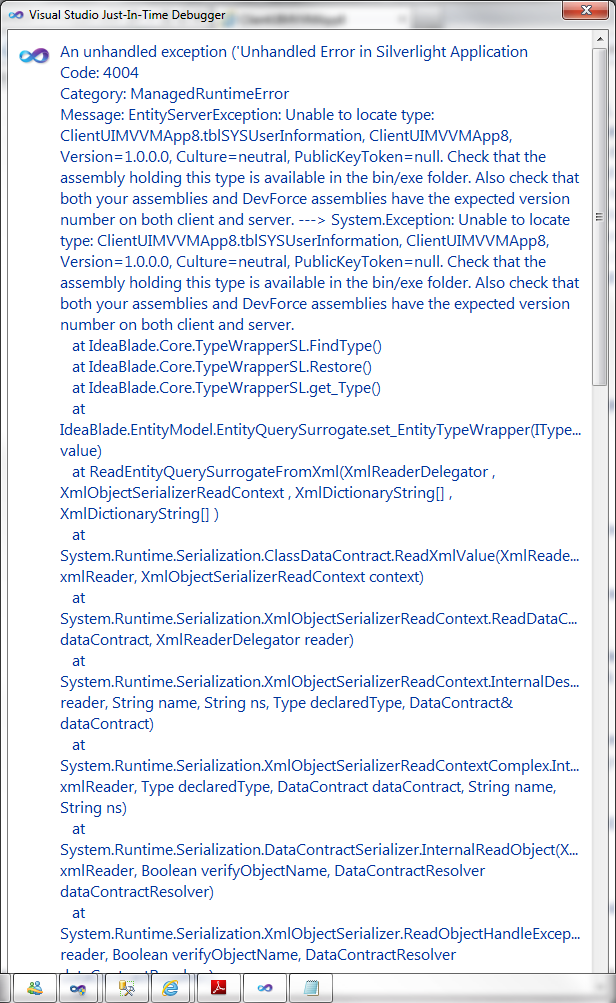 Would anybody be able to offer any clues? I've set the devforce dlls to copy local and false. I'm at a bit of loss. I've attached the log as well, if that can help. uploads/1074/DebugLog.txt - uploads/1074/DebugLog.txt Many thanks Terry |
Replies:
Posted By: smi-mark
Date Posted: 18-Feb-2011 at 6:30am
|
It looks like you are missing a dll on the web server - it's possible it's not copied to the bin directory. Do you have a ClientUIMVVMApp8.dll in there? It may help to attach a sample project demonstrating this. |
Posted By: Terry Wells
Date Posted: 18-Feb-2011 at 6:51am
|
Thanks for the reply smi-mark, The DLL wasnt in there - I have rebuit, copied it and same error I'm afraid. I'll do as you suggest and upload a sample project - I'll just have to rejig it to use Northwinds as I'm using my own SQL db. Terry
|
Posted By: smi-mark
Date Posted: 18-Feb-2011 at 6:57am
|
Does your DebugLog.xml show any different this time? If it's picking up your dll it should show this: <entry id="3" timestamp="2011-02-18T08:37:53" username="" source="IdeaBlade.Core.Composition.CompositionHost:.ctor">Probe Assemblies: FrameworkTest.Models.Northwind, Version=1.0.0.0, Culture=neutral, PublicKeyToken=null :: FrameworkTest.Web, Version=1.0.0.0, Culture=neutral, PublicKeyToken=null If this list is unnecessarily large, use CompositionHost.SearchPatterns to modify the search critieria for probed assemblies. If this list does not contain the assembly(ies) holding your a) domain model, b) custom interface implementations, and c) POCO/known types then your application may not work correctly. Ensure that these assemblies are available in the exe/bin folder, and if using CompositionHost.SearchPatterns that the patterns are set appropriately.</entry> As you can see, it has picked up my domain model "FrameworkTest.Models.Northwind" and also "FrameworkTest.Web" In yours I see it has only probed the web dll, which is not the domain model project. ClientUIMVVMApp8.Web, Version=1.0.0.0, Culture=neutral, PublicKeyToken=null |
Posted By: Terry Wells
Date Posted: 18-Feb-2011 at 12:24pm
|
Unfortunately its not picking up the models when probing like your example. I'm at a loss as to why. The project is too large to upload, but I've put it on my public Skydrive http://cid-fa882e1ac3f0d699.office.live.com/browse.aspx/.Public?uc=1 - http://cid-fa882e1ac3f0d699.office.live.com/browse.aspx/.Public?uc=1 Thanks
|
Posted By: smi-mark
Date Posted: 18-Feb-2011 at 3:34pm
I've figured it out!
|
Posted By: Terry Wells
Date Posted: 18-Feb-2011 at 3:54pm
|
Smi-Mark,
Thank you so much for looking at this for me. It works! - I would never have figured that out?!
Do you ever pass thru London? If you do - then I owe you a beer! - I mean it.
Thanks so much for your help - I have been trying to get traction on this project for over a week, and you have given me the start.
Regards
Terry
|
Posted By: smi-mark
Date Posted: 18-Feb-2011 at 4:22pm
|
No problem. I pass through once in a while, I'll let you know if I'm coming anytime soon! One thing to be aware of, each time you save your model it will overwrite this, unless you update the template. Until IdeaBlade explains the best way to achieve this, you can go into your Model1.edmx.tt file and replace it with this: <#@ template language="C#" debug="true" hostSpecific="true" #> |
Posted By: sbelini
Date Posted: 21-Feb-2011 at 3:36pm
|
Hi Terry and Smi-mark,
The reason you are having the issue is because in your solution, is because the SL project and the web project have different namespaces. (that will happen when the solution is not created using the DevForce Silverlight Application template)
So, another way to overcome the issue without the need to customize the template (and adding a ref to the web project in your SL code) is renaming the namespace of the web project to match the SL project's. In your case, you will also need to update global.asax to reflect this change (i.e. Inherits="ClientUIMVVMApp8
Regards,
Silvio.
|
Posted By: Terry Wells
Date Posted: 22-Feb-2011 at 1:34am
|
Another great solution, thanks for the help guys. Regards Terry |
Posted By: Terry Wells
Date Posted: 23-Feb-2011 at 12:50pm
|
I'm having further warnings with this message repeated 22 times:-
Warning 1
Failed to load types from assembly 'Intersoft.Client.Data.Provider.DevForce, Version=1.0.0.0, Culture=neutral, PublicKeyToken=c3d9b11444163e76' so the assembly will be ignored.
Cannot resolve dependency to assembly 'IdeaBlade.EntityModel.SL, Version=6.0.8.0, Culture=neutral, PublicKeyToken=287b5094865421c0' because it has not been preloaded. When using the ReflectionOnly APIs, dependent assemblies must be pre-loaded or loaded on demand through the ReflectionOnlyAssemblyResolve event. ClientUIBusinessApp1 Doesn't stop the app from running as yet, but would be nice to figure out whats wrong.
Any clues?
Many thanks
Terry
|