Another "generic" question. Coming up with BaseRepository
Printed From: IdeaBlade
Category: DevForce
Forum Name: DevForce 2010
Forum Discription: For .NET 4.0
URL: http://www.ideablade.com/forum/forum_posts.asp?TID=3210
Printed Date: 27-Jun-2026 at 8:26pm
Topic: Another "generic" question. Coming up with BaseRepository
Posted By: katit
Subject: Another "generic" question. Coming up with BaseRepository
Date Posted: 11-Jan-2012 at 9:30pm
|
I'm finding that all my data repositories look alike and decided to try and make one base class with generics. However, I'm struggling with following piece of code(see screenshot). How do I create entity instance of <T> in this GetNew() method? 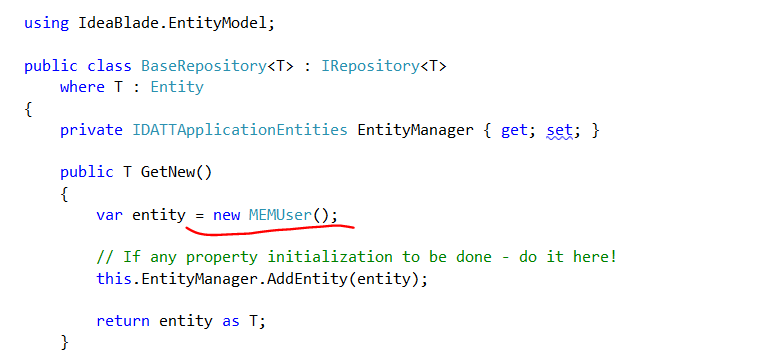 |
Replies:
Posted By: katit
Date Posted: 12-Jan-2012 at 6:32am
| Found solution.. Needed to do where T: Entity, new()var Entity = new T(); //works |
Posted By: smi-mark
Date Posted: 12-Jan-2012 at 8:33am
|
Rather than create a repository per entity type, you may want to create one per unit-of-work. Otherwise you are going to be creating a lot more work for your self than needed. By unit of work, I mean a related set of entities. An example might be employees, the primary entity is Employee, but you also may have contacts, addresses, and other such related entities. This is what I do: public abstract class RepositoryBase<T> : IRepository where T : EntityManager { |
Posted By: katit
Date Posted: 12-Jan-2012 at 8:43am
|
Actually, I am creating repository per unit of work as you suggest. Entity type in this case represents primary entity and I use "includes" to get other related entities that I need. Each repository takes care of maintaining (CRUD) whole MVVM for Silverlight's view. Since you posted this sample, I was wondering why do I want to use INotifyCompleted? I find it easier to write code like below. When do I see benefit of using this interface? Simple Actions work well for me. public void SaveAll(Action onSuccess = null, Action<Exception> onFail = null) { var op = this.EntityManager.SaveChangesAsync(); op.OnComplete(onSuccess, onFail); }
|
Posted By: smi-mark
Date Posted: 12-Jan-2012 at 9:11am
|
One of the places I make use of the INotifyCompleted is with my Busy indicators. I might write some code like this: Employee employee; Busy.AddWatch(); Repository.GetEmployees(123, e => employee = e, ErrorHandler.HandleError) .WhenCompleted(args => Busy.RemoveWatch()); This way it's saying, no matter what the result, success or fail, I want to make sure I am executing a certain action. Without this, you are forced to write code that looks like this: Busy.AddWatch(); Repository.GetEmployees(123, e => { employee = e Busy.RemoveWatch(); }, (ex) => { ErrorHandler.HandleError(ex); Busy.RemoveWatch(); }); |
Posted By: katit
Date Posted: 12-Jan-2012 at 9:13am
| Fair enough. Yes, I was writing BusyOff on error and success, so that will help me make this async code even better.. |