String or binary data would be truncated.
Printed From: IdeaBlade
Category: DevForce
Forum Name: DevForce 2010
Forum Discription: For .NET 4.0
URL: http://www.ideablade.com/forum/forum_posts.asp?TID=3321
Printed Date: 27-Jun-2026 at 1:11pm
Topic: String or binary data would be truncated.
Posted By: orcities
Subject: String or binary data would be truncated.
Date Posted: 07-Mar-2012 at 11:43am
|
I am having an issue updating text to a string property that has the Max size of String.Max. It gives me the following error: String or binary data would be truncated. The statement has been terminated. Source: IdeaBlade.EntityModel StackTrace: at System.Data.SqlClient.SqlConnection.OnError(SqlException exception, Boolean breakConnection)
at System.Data.SqlClient.TdsParser.ThrowExceptionAndWarning() at System.Data.SqlClient.TdsParser.Run(RunBehavior runBehavior, SqlCommand cmdHandler, SqlDataReader dataStream, BulkCopySimpleResultSet bulkCopyHandler, TdsParserStateObject stateObj) at System.Data.SqlClient.SqlDataReader.ConsumeMetaData() at System.Data.SqlClient.SqlDataReader.get_MetaData() at System.Data.SqlClient.SqlCommand.FinishExecuteReader(SqlDataReader ds, RunBehavior runBehavior, String resetOptionsString) at System.Data.SqlClient.SqlCommand.RunExecuteReaderTds(CommandBehavior cmdBehavior, RunBehavior runBehavior, Boolean returnStream, Boolean async) at System.Data.SqlClient.SqlCommand.RunExecuteReader(CommandBehavior cmdBehavior, RunBehavior runBehavior, Boolean returnStream, String method, DbAsyncResult result) at System.Data.SqlClient.SqlCommand.RunExecuteReader(CommandBehavior cmdBehavior, RunBehavior runBehavior, Boolean returnStream, String method) at System.Data.SqlClient.SqlCommand.ExecuteReader(CommandBehavior behavior, String method) at System.Data.SqlClient.SqlCommand.ExecuteDbDataReader(CommandBehavior behavior) at System.Data.Mapping.Update.Internal.DynamicUpdateCommand.Execute(UpdateTranslator translator, EntityConnection connection, Dictionary`2 identifierValues, List`1 generatedValues) at System.Data.Mapping.Update.Internal.UpdateTranslator.Update(IEntityStateManager stateManager, IEntityAdapter adapter) |
Replies:
Posted By: DenisK
Date Posted: 07-Mar-2012 at 4:58pm
|
Hi orcities, Please verify that the string property is also set to Max on the Sql database column.
|
Posted By: orcities
Date Posted: 08-Mar-2012 at 8:16am
| It is, and I can take the same string value and update the database using and update script. |
Posted By: orcities
Date Posted: 08-Mar-2012 at 8:20am
|
Database table: Summary 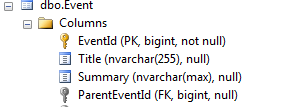 Entity: Entity: 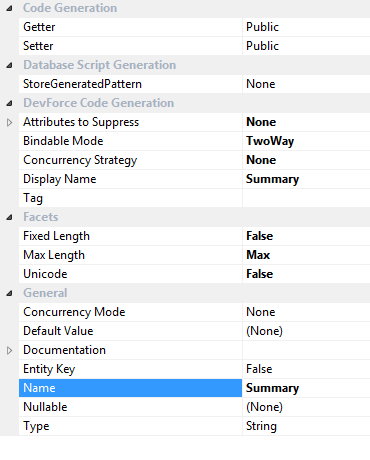 |
Posted By: DenisK
Date Posted: 08-Mar-2012 at 2:47pm
| Hmm, interesting. Your screenshot does show that both Entity.Summary and dbo.Event.Summary string length are set to Max. I have no other suggestion than to ask you to isolate this in a unit test and send it over through our customer support form. I'll be able to do better investigation this way. |
Posted By: orcities
Date Posted: 08-Mar-2012 at 3:14pm
|
In putting together a sample. I used the same DomainModel project with only programatically made the change then saved. And it saved successfully. Why would it not work with the same DataModel in a different solution?
|
Posted By: DenisK
Date Posted: 08-Mar-2012 at 6:01pm
|
A couple of reasons that I can think of are: 1. The connection string in your .config file on your main solution is not pointing to the same database as the .config file in your test solution. 2. If you are using a DataSourceKey with different data source extensions, you might be connecting to a different database instance. For eg: a test database rather than a prod database. Other than that, you're probably in a better position to investigate as you're familiar with the solution's and database configuration.
|
Posted By: orcities
Date Posted: 22-Mar-2012 at 4:02pm
|
I was able to duplicate the issue on an outside project. It allows me to alter the text when I am only using the DomainModel. As soon as I add in the Server portion it doesn't work. Any ideas.
|
Posted By: orcities
Date Posted: 22-Mar-2012 at 4:12pm
| Found the issue. It wasn't the field causing the problem it was the audit mechanism. |