DockPanelWorkspace. Reactivation of smartpart: error
Printed From: IdeaBlade
Category: DevForce
Forum Name: DevForce Classic
Forum Discription: For .NET 2.0
URL: http://www.ideablade.com/forum/forum_posts.asp?TID=631
Printed Date: 11-Jun-2026 at 9:18am
Topic: DockPanelWorkspace. Reactivation of smartpart: error
Posted By: vecs
Subject: DockPanelWorkspace. Reactivation of smartpart: error
Date Posted: 25-Dec-2007 at 2:55am
|
Hello, I have made new shell layout contained freeware DockPanelWorkspace from http://www.codeplex.com/cabext - http://www.codeplex.com/cabext as "ShellContent": 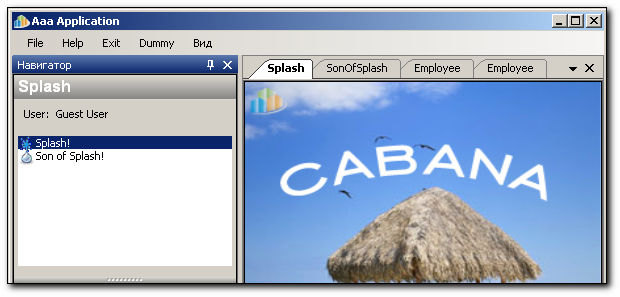 But I am getting an exception when try to close and then reopen the same page. It seems that View (SmartPart) were disposed and removed from its WorkItem when I closed tab. So when I try to activate this View (SmartPart) again the PageController can not find this View and raises exception ("Cannot access a disposed object. Object name: '...'."). Or sometimes SmartPart removed from Workspace and "The smartpart is not present in the workspace" error raised when try to activate View second time. BTW I found the same problem with ModalWindowsWorkspace ("The smartpart is not present in the workspace" error) on reactivation. Any suggestions how to solve this problem? For now I suppose one solution for this: Find the way to dispose PageController when its MainView closed in DockWorkspace or in ModalWindowsWorkspace. But I dont know how implement this. For a while I have disabled tabs closing so that tab once appeared remain alive till the end of user session. But IMHO it is not rational.. ------------- |
Replies:
Posted By: Bill Jensen
Date Posted: 28-Dec-2007 at 4:50pm
|
Well, you could try this:
In your PageController's static ShowPage() method, after calling the ShowPage<TController> base method, get the controller instance and setup a handler for the SmartPartClosing event of the main workspace:
controller.MainWorkspace.SmartPartClosing += new System.EventHandler<WorkspaceCancelEventArgs>(controller.MainWorkspace_SmartPartClosing);Then add the handler:
{ // If it's our main view that's closing if (e.SmartPart.Equals(this.MainView)){ // Terminate this controlled workitem // So a new controller will be created and initialized on the next Show() call this.Terminate(e);} } The Terminate(WorkspaceCancelEventArgs e) method is a a little bit tricky. It sets the cancel flag in the event args to true. If this isn't done, exceptions happen. I've tried this briefly with a WindowWorkspace and it seems to work, but I'm not sure it will work with your DockPanelWorkspace.
Let me know if this helps.
Good luck,
Bill Jensen
|
Posted By: vecs
Date Posted: 29-Dec-2007 at 1:10am
|
Thank you very much, Bill! It is exactly what we needed. This work perfect with DockPanelWorkspace too. But I found it does not work with "ModalWindows" workspace when I set this: ((WindowSmartPartInfo)MainView.SmartPartInfo).Modal = true; The reason is that controller.MainWorkspace.SmartPartClosing event not fired after dialog closing. ------------- |
Posted By: DeLight
Date Posted: 10-Jan-2008 at 1:38am
|
as I remember, the problem is:
1.
in EntityEditorController.
2. MainWorkspace.Show(MainView) calls Form.ShowDialog() (in case of modal dialogs) so OnFirstShow() is not called until dialog window is closed. So editorWs.SmartPartClosing += EditorClosingHandler; is not called until dialog is closed. So SmartPartClosing event is not processed (not "not fired").
btw, solwed the "Reactivation of smartpart: error" problem with:
1. processing closing event in all pagecontrollers (not only editors).
2. if we need the page to be hidden (not closed) when pushing the close button:
щьёрт, не заметил Russian Federation. ко мне можно и по-русски. а лучше в аське сразу - 376440623 (рабочая), 108588 (домашняя). опыт работы с кабаной почти год уже, поделиться не против.
|